
Colibrico Design Studio1.1.20 - Download
You'll be able to download in few seconds.
Publisher Description
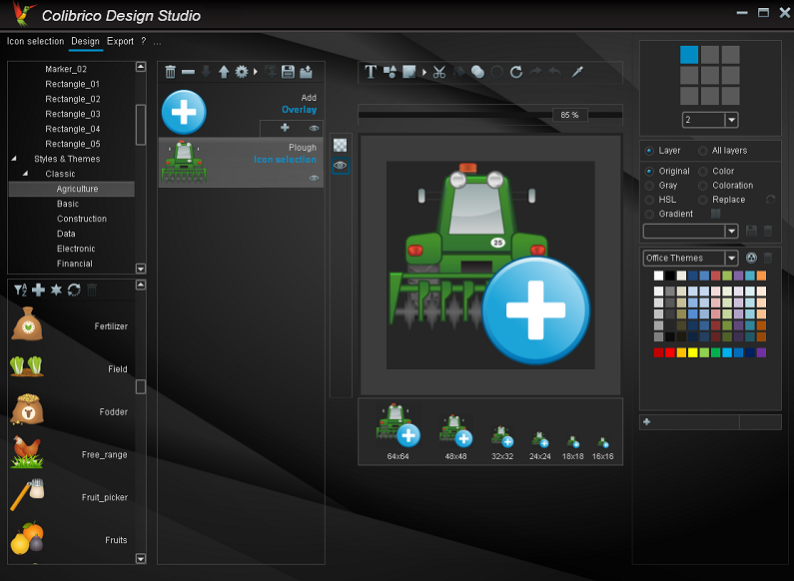
Colibrico Design Studio is a design tool with an extensive icon library.
Colibrico Design Studio automates the creation of graphics and icon sets.
Providing the graphics via the graphic tool offers several advantages.
- The graphics can be exported in any size.
- All graphics can be combined.
- Color filters can be used to create additional color variations of the graphics.
- The graphics are presented in a clear form.
- The search function helps you to select a symbol.
- With design elements and additional effects, modern and individual button sets
can be created in any color
With design templates you can create individual graphics, an icon set or a button set easy and fast.
For the creation of individual button sets, different design elements with background shapes, frames, lighting effects and shadow effects are offered.
Saved color filters or custom changes are applied to all selected graphics. This allows you to create and export multiple color variants in a matter of seconds.
Design settings can be saved and reused for additional icon sets. You can create individual color groups and apply them to a flat icon set.
You can import your own SVG graphics to speed up the creation of icon sets.
The file formats SVG, PNG, JPG, BMP and ICO are supported for export.
About Colibrico Design Studio
This Icon Tools program is available in English, German, Spanish. It was last updated on 29 September, 2026. Colibrico Design Studio is compatible with the following operating systems: Windows.
The company that develops Colibrico Design Studio is Jürgen Schaetzke EDV Beratung Programm. The latest version released by its developer is 1.1.20.
The download we have available for Colibrico Design Studio has a file size of 35.7 MB. Just click the green Download button above to start the downloading process. The program is listed on our website since 2018-02-01 and was downloaded 0 times. We have already checked if the download link is safe, however for your own protection we recommend that you scan the downloaded software with your antivirus. Your antivirus may detect the Colibrico Design Studio as malware if the download link is broken.
How to install Colibrico Design Studio on your Windows device:
- Click on the Download button on our website. This will start the download from the website of the developer.
- Once the Colibrico Design Studio is downloaded click on it to start the setup process (assuming you are on a desktop computer).
- When the installation is finished you should be able to see and run the program.
Program Details
General
System requirements
Download information
Pricing
Version History
version 1.1.19
posted on 2018-02-01
New: Import function for Colibrico Icon Sets
New: Icon Sets in 3 new styles
New: Option opacity for all layers or current layer
Changed: Color templates enhanced with layers (All or current layer)
Minor fix: Coloring
version 1.1.20
posted on 2018-02-01
RAM error with large icon sets solved
version 1.1.18
posted on 2017-11-02
New: Optionbox SVG color values in percent or integer
New: Optionbox Create subfolder for file format automatically
New: Optionbox Create subfolder for size automatically
Disclaimer
External Download
We do not host Colibrico Design Studio on our servers. We did not scan it for viruses, adware, spyware or other type of malware. This app is hosted by the software publisher and passed their terms and conditions to be listed there. We recommend caution when installing it.
The external download link for Colibrico Design Studio is provided to you by apps112.com without any warranties, representations or guarantees of any kind, so access it at your own risk.
If you have questions regarding this particular app contact the publisher directly. For questions about the functionalities of apps112.com contact us.
